

Add Bluetooth to Your Harley Radio Without Guesswork
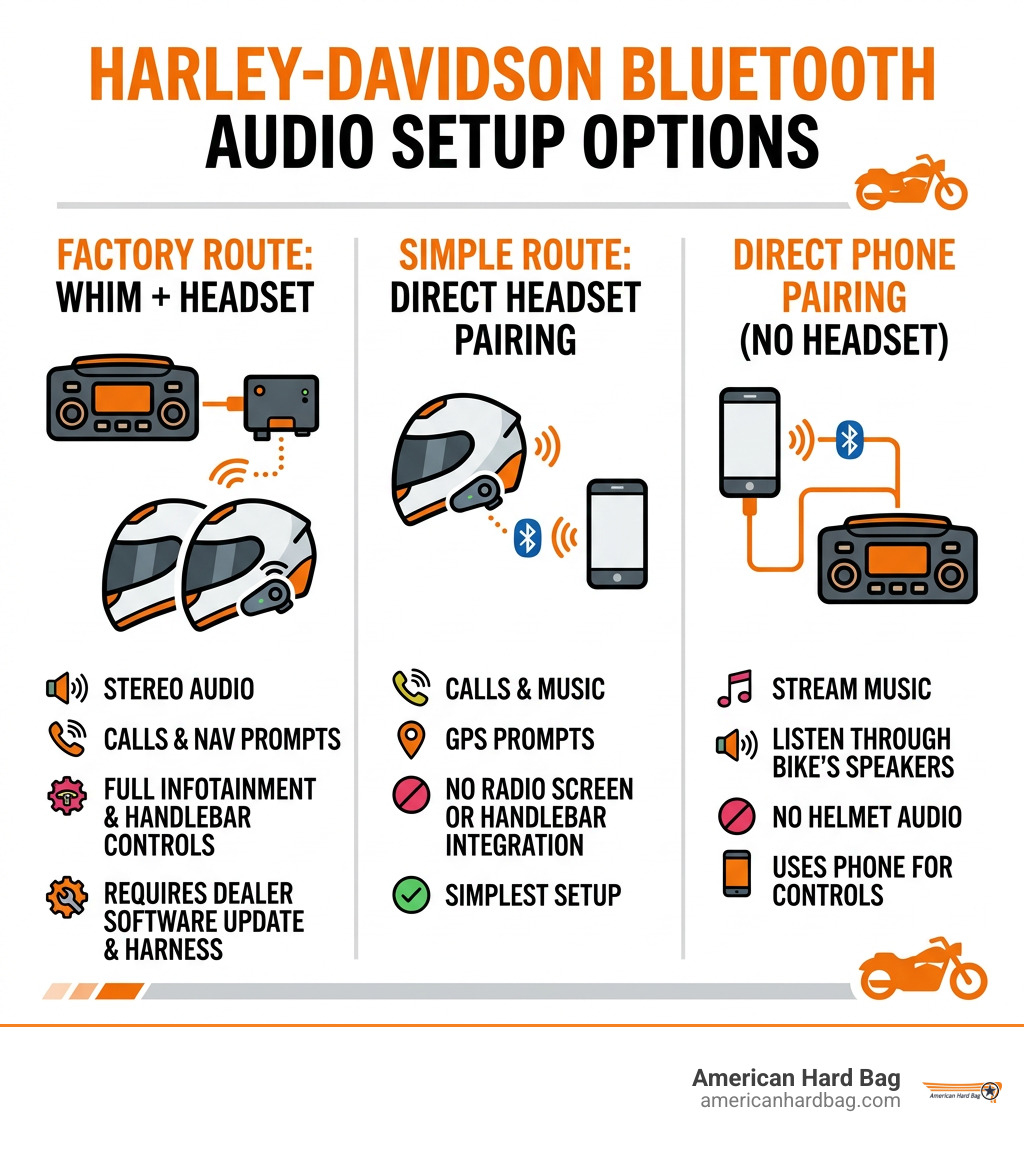
To add Harley radio Bluetooth to a compatible Boom! Box 6.5GT or GTS system, use the Wireless Headset Interface Module (WHIM), then pair a compatible wireless headset. This is the factory-style route for stereo audio, calls, navigation prompts, and selected infotainment controls through your helmet.
Before buying anything, check these three points:
- Confirm your motorcycle has a compatible Boom! Box 6.5GT or GTS radio.
- Verify WHIM fitment for your exact year and model, since several newer CVO and Touring models are excluded.
- Plan for the required in-fairing harness and dealer software update.
If your bike cannot use WHIM, or you want a simpler setup, pair a Bluetooth headset directly to your phone. You will still get calls, music, and GPS prompts, but not full radio-screen and handlebar-control integration.
American Hard Bag builds durable motorcycle accessories for riders who want practical upgrades that last. In this guide, we break down Harley radio Bluetooth options so you can choose the right path before opening the fairing.
Harley Radio Bluetooth Options and Wireless Audio Solutions
For years, touring riders were tethered to their tanks by coiled DIN cords. If you forgot to unplug before stepping away at a gas pump, your helmet got yanked backward. Modern wireless integration solves that problem completely.
When you want to stream high-fidelity sound, manage phone calls, and catch turn-by-turn navigation prompts on your bike, you have three primary wireless pathways:
- The OEM Wireless Headset Interface Module (WHIM): An internal module that communicates directly between your Boom! Box infotainment unit and your helmet headset.
- Aftermarket Bluetooth Receivers / Auxiliary Adapters: Add-on modules wired to an auxiliary audio input or harness that stream audio from a phone to the dash speakers.
- Direct Phone-to-Headset Pairing: Bypassing the motorcycle's head unit entirely by connecting your phone straight to a modern helmet communicator.
If your goal is to modernize your bike's audio while keeping the dash controls intact, configuring a dedicated Harley Bluetooth stereo connection ensures that your handlebar switches operate smoothly at highway speeds.
Adding Harley Radio Bluetooth via the Wireless Headset Interface Module (WHIM)
The factory route to wireless freedom on Harley-Davidson Touring models is the Wireless Headset Interface Module. The WHIM is an electronic transceiver installed behind the fairing that links the Boom! Box 6.5GT or GTS infotainment system to Bluetooth helmet communicators.
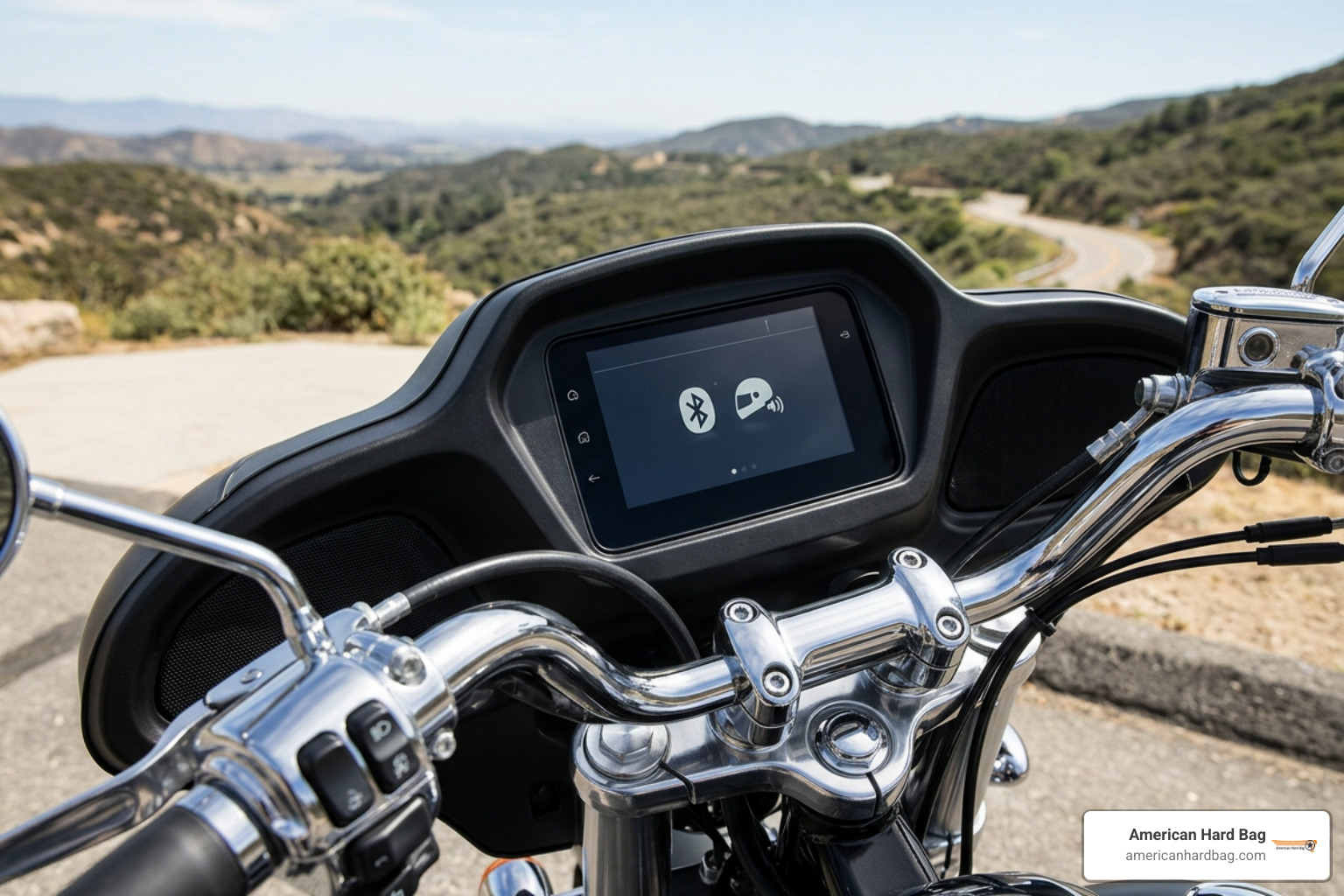
Once installed and flashed by a technician, the WHIM unlocks:
- Dual-Headset Connectivity: Seamlessly connect two Bluetooth headsets at once, allowing rider and passenger to listen to music, hear navigation, and talk via intercom simultaneously.
- Full Infotainment Screen Integration: See battery levels, headset connection states, and caller ID directly on the dash screen.
- Full Thumb-Control Access: Change tracks, adjust volume, toggle intercom channels, and answer phone calls using factory handlebar controls without moving your hands from the grips.
- Apple CarPlay / Android Auto Support: Because the WHIM provides a recognized wireless microphone input to the head unit, it satisfies the voice-input requirement for Apple CarPlay on Boom! Box GTS units.
Integrating a WHIM keeps your factory Harley radio operating as the central brain of your infotainment setup without ugly external wires running down your handlebars.
Standalone Headset Setup Without Harley Radio Bluetooth Hardware
You don't necessarily need the WHIM to enjoy wireless helmet audio. If you own an older bike, a non-compatible trim, or simply prefer not to disassemble your fairing, a standalone headset setup is a great choice.
In a standalone setup, you pair your helmet headset directly to your smartphone via standard Bluetooth 5.0 channels.
What you get:
- High-definition stereo audio streaming directly from Spotify, Apple Music, or your favorite media app.
- Direct access to your phone's native assistant (Siri or Google Assistant) through voice commands.
- Turn-by-turn GPS prompts routed directly into your helmet speakers.
- Clear rider-to-rider intercom through independent Mesh or Bluetooth communication channels.
What you sacrifice:
- No track display or media management on the Boom! Box dash screen.
- Handlebar thumb controls will not adjust helmet volume or skip songs played from the phone.
- The motorcycle's CB radio and onboard navigation prompts cannot be routed into your helmet.
For many riders building a streamlined audio system, as outlined in our Harley Street Glide audio guide, direct-pairing helmet headsets provide pure music and clear communication while leaving fairing speakers dedicated to high-output highway cruising.
Integrating the Harley-Davidson Audio 50S Dual Pack Headset
When using the WHIM module, your choice of headset matters. The premier factory-matched solution is the Harley-Davidson Audio 50S Bluetooth Headset – Dual Pack. Built on proven multi-channel communication hardware, the 50S is custom-engineered to integrate directly with the Boom! Box system.
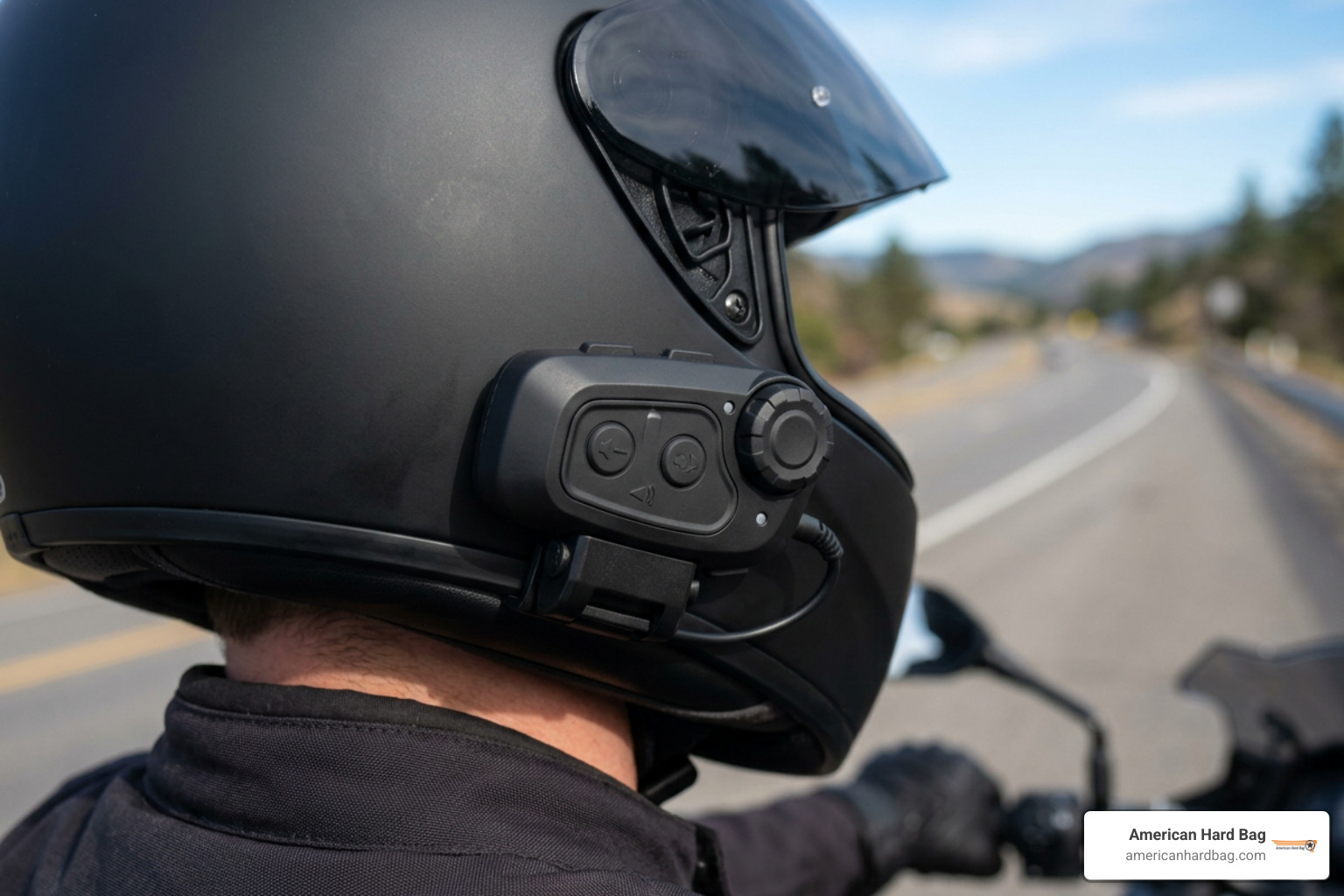
The Audio 50S incorporates dual communication architectures: a dedicated Bluetooth 5 radio and a Mesh 2.0 transceiver. Pairing this headset with the bike gives you access to premium Harley audio speaker drivers that sit inside the helmet ear pockets, delivering rich bass and crisp highs designed to overcome exhaust and wind noise.
The 50S also features an automatic Wi-Fi updating system. The included charging cable houses an integrated Wi-Fi adapter; whenever you plug the headset in to charge near your home network, it automatically checks for, downloads, and installs the latest firmware updates.
Mesh 2.0 vs. Bluetooth Intercom Capabilities
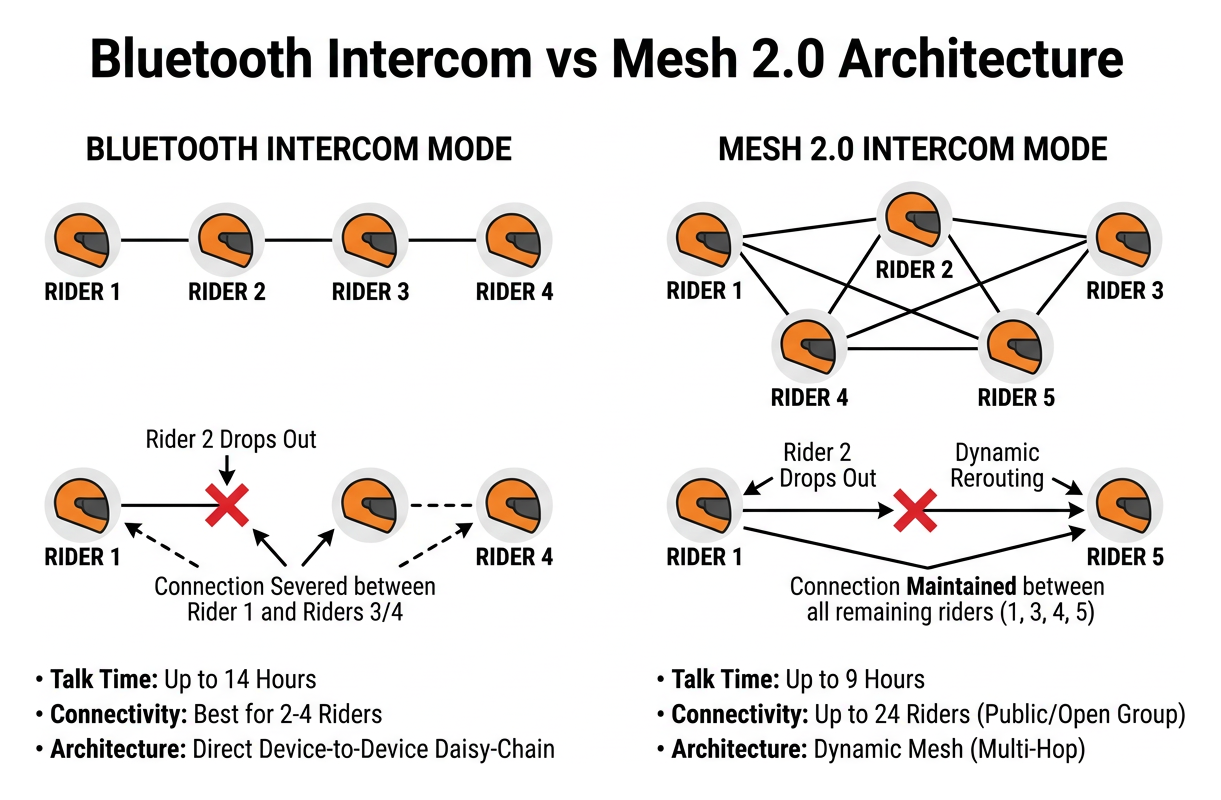
Understanding the difference between Mesh 2.0 and standard Bluetooth intercom channels is essential when riding in groups or traveling with a passenger:
1. Bluetooth Intercom Mode
Bluetooth intercom uses direct device-to-device daisy-chain pairing.
- Talk Time: Up to 14 hours.
- Connectivity: Best for 2 to 4 riders.
- Behavior: If Rider 2 drops out of range in a four-rider daisy chain, the connection between Rider 1 and Riders 3 and 4 is severed until the link is re-established.
- Compatibility: Easily connects to older helmet communicators and non-mesh devices.
2. Mesh 2.0 Intercom Mode
Mesh 2.0 operates on an intelligent, dynamic network topology.
- Talk Time: Up to 9 hours.
- Connectivity: Supports up to 24 riders in private groups, or virtually limitless participants in Open Mesh mode across 6 distinct channels.
- Behavior: The network self-heals in milliseconds. If one rider stops for fuel or falls behind, the rest of the group remains connected without interruption. When the missing rider returns, they re-enter the conversation automatically.
- Range: Up to 5 miles (8 km) across a minimum of 6 riders spaced along the highway.
Matching robust in-helmet mesh communicators with high-performance speakers for a Harley-Davidson ensures you stay connected whether you're communicating privately with your passenger or coordinating lane changes with a dozen bikes.
Handlebar Controls, Infotainment Sync, and Standalone Pairing
When the Audio 50S is paired through the WHIM, riders enjoy complete control without fumbling with their helmets at speed.
- Infotainment Sync: You can manage headset settings, toggle intercom channels, balance fairing-to-helmet faders, and check battery levels directly through the Boom! Box dashboard.
- Handlebar Thumb Controls: Volume adjustments, track changes, voice command activation, and call handling can all be performed via factory hand switches.
- Jog-Dial Operation: When away from the bike or using direct-phone pairing, the glove-friendly side jog-dial allows intuitive tap-and-rotate adjustments on the fly.
- Advanced Noise Control & Ambient Mode: Built-in digital signal processing automatically minimizes wind and engine drone over the microphone, while Ambient Mode lets you hear gas station attendants or riding partners without removing your helmet.
Whether you're doing a full motorcycle audio upgrade or refining your everyday commute, the 50S provides complete operational versatility.
WHIM Fitment, Installation Requirements, and Incompatible Models
Installing the WHIM requires opening the fairing, making the proper wiring connections, and performing a digital software flash on the motorcycle.
Factory Wiring, Harness Needs, and Dealer Digital Tech Flashing
To install the WHIM properly:
- Fairing Removal & Placement: The fairing is removed to access the radio cradle. The WHIM hardware mounts cleanly behind the fairing using factory mounting locations, keeping all wiring protected from weather and road debris.
- Harness Integration: Touring models require a model-specific harness to interface between the WHIM module, the Boom! Box radio, and the motorcycle’s primary CAN-bus backbone.
- Dealer Digital Technician Flash: The WHIM is not strictly plug-and-play out of the box. Once wired, a dealer or independent shop with diagnostic flashing tools must connect to the bike's diagnostic port and flash the Boom! Box software. This tells the radio that the WHIM is present, activating the wireless audio menus, Bluetooth pairing screens, and stereo output codec.
- Antenna Interference Consideration: On certain model years (notably some 2014–2020 CVO and Ultra models), positioning the WHIM transceiver near the front fairing harness can cause minor signal degradation on satellite radio (SiriusXM) antennas. Proper wire routing is critical during a Harley fairing audio upgrade to keep all antennas separated.
If you are also installing high-power aftermarket amplifiers or completing a Harley radio navigation upgrade, combine your teardown steps. Routing your harnesses and completing any necessary flashes at the same time as your Harley Touring amplifier install saves hours of labor. Consult our ultimate Harley audio parts guide for comprehensive system design advice.
Touring Bike Fitment Exclusions and Incompatible Model Years
While the WHIM is compatible with most 2014–2023 Touring and Trike models equipped with the Boom! Box 6.5GT or GTS, several newer models have transitioned to updated infotainment architectures and cannot use the legacy WHIM module:
- 2023-later CVO Street Glide (FLHXSE) and CVO Road Glide (FLTRXSE)
- 2024-later Street Glide (FLHX), Road Glide (FLTRX), and CVO Road Glide ST (FLTRXSTSE)
- 2025-later Ultra models (FLHXU) and Road Glide RR (FLTRXRRSE)
These newer models use next-generation Skyline OS infotainment architectures with redesigned, built-in wireless hardware and are physically and electronically incompatible with the legacy WHIM kit. Always check fitment by your motorcycle's exact VIN before purchasing retrofit modules.
Frequently Asked Questions About Harley Bluetooth Audio
Will my wired headset microphone still work after installing a WHIM?
No. When the WHIM is installed and enabled via the dealer software flash, the bike's wired microphone input is deactivated.
However, your wired audio output (music and navigation listening through wired helmet speakers) remains functional. If you transition to the WHIM, you must use a paired wireless Bluetooth headset for all voice communication, CB radio transmission, Apple CarPlay prompts, and intercom functions.
Can non-Harley Bluetooth headsets stream stereo audio through the Boom! Box?
While standard non-Harley Bluetooth communicators can technically pair with the WHIM for basic communication, Harley-Davidson utilizes a proprietary software codec within the WHIM.
When a non-Harley-branded headset is detected, the Boom! Box system limits music playback to mono sound (A2DP profile restricted) with lower fidelity. To unlock full, high-definition stereo sound through the WHIM, you must use a Harley-branded wireless headset (such as the Audio 50S, 50R, or Boom! Audio 30K/20S EVO).
If you prefer using non-Harley headsets, pairing your headset directly to your smartphone ensures you receive full, uncompressed high-fidelity stereo audio.
What warranty and shipping terms apply to Harley wireless modules?
Factory Harley-Davidson audio components, including the WHIM and Audio 50S headsets, are covered by a 1-year limited parts warranty. If installed by an authorized dealership at the time of motorcycle purchase, they may be incorporated into the bike's broader multi-year factory warranty. Standard ground shipping applies across the United States.
Conclusion
Cutting the cord on your Harley-Davidson transforms the riding experience. Whether you install the Wireless Headset Interface Module (WHIM) for deep infotainment and handlebar-control integration or connect a high-performance Bluetooth 5.0 and Mesh 2.0 headset directly to your smartphone, wireless audio gives you freedom from tangled cables without sacrificing your music or group communication.
When you're ready to take your motorcycle's sound system beyond factory limits, American Hard Bag is here with American-engineered, plug-and-play audio upgrades designed specifically for Harley-Davidson Touring bikes. From direct-fit fairing speakers to precision amplifier mounting brackets and plug-and-play wiring harnesses, our systems deliver crystal-clear, concert-level audio built to overpower wind, road, and exhaust noise at any speed.
Explore our comprehensive installation resources and check out the ultimate guide to upgrading your Harley-Davidson audio system to start building your ultimate touring audio setup today.